
Alerts
Machine-learning alerts
Train a model on the sensor and weather history and alert on what it did not predict.
When to use a machine-learning alert
A static threshold fires when a number crosses a line. A moving-average rule fires when a number leaves its own recent band. A machine-learning alert fires when a reading leaves the band around what a model predicted for that moment, given everything else the site and the sky were doing. It is the rule to reach for when the normal value of a variable depends on other things: conductivity that rises with every storm, a depth that tracks rainfall upstream, a temperature that follows air temperature and cloud. A fixed bound either pages on every storm or sleeps through the excursion; a model that expects the storm does neither.
Prefer a static or moving-average rule when the condition really is a number crossing a line, when you need the rule to fire from the first reading, or when the site has little history — a model needs weeks of readings to learn from and is trained overnight, so it is never instant. It is also the only rule kind whose answer you should periodically check for quality; the score history is where you do that.
Recipients, pause and resume, the quiet period and the alert log work as they do for every other kind and are described on the alerts overview. Rules live under Machine-learning alerts (the page calls them that; the alerts hub calls them advanced).
How it works
- When you save a rule, a model is trained on the site's recent history (a hyperparameter search over the estimator you chose, plus a search over which of your selected variables actually help). The newest slice of history is held back and the finished model is scored on it.
- Every evaluation cycle the stored model predicts the current value of the target from the latest readings (and the weather forecast, if you gave it a location), and a band is drawn around that prediction from the two thresholds.
- A reading outside the band is a breach; Min consecutive breaches breaches in a row is a firing, subject to the quiet period and the rain settings.
- On its schedule the model is reinforced with the data that has arrived since, and optionally rebuilt from scratch.
Note. Until the first model has been trained, the rule evaluates nothing and cannot fire. Training starts when you save and usually finishes in seconds to minutes; the model chip on the rule's card tells you where it is.
Creating a rule
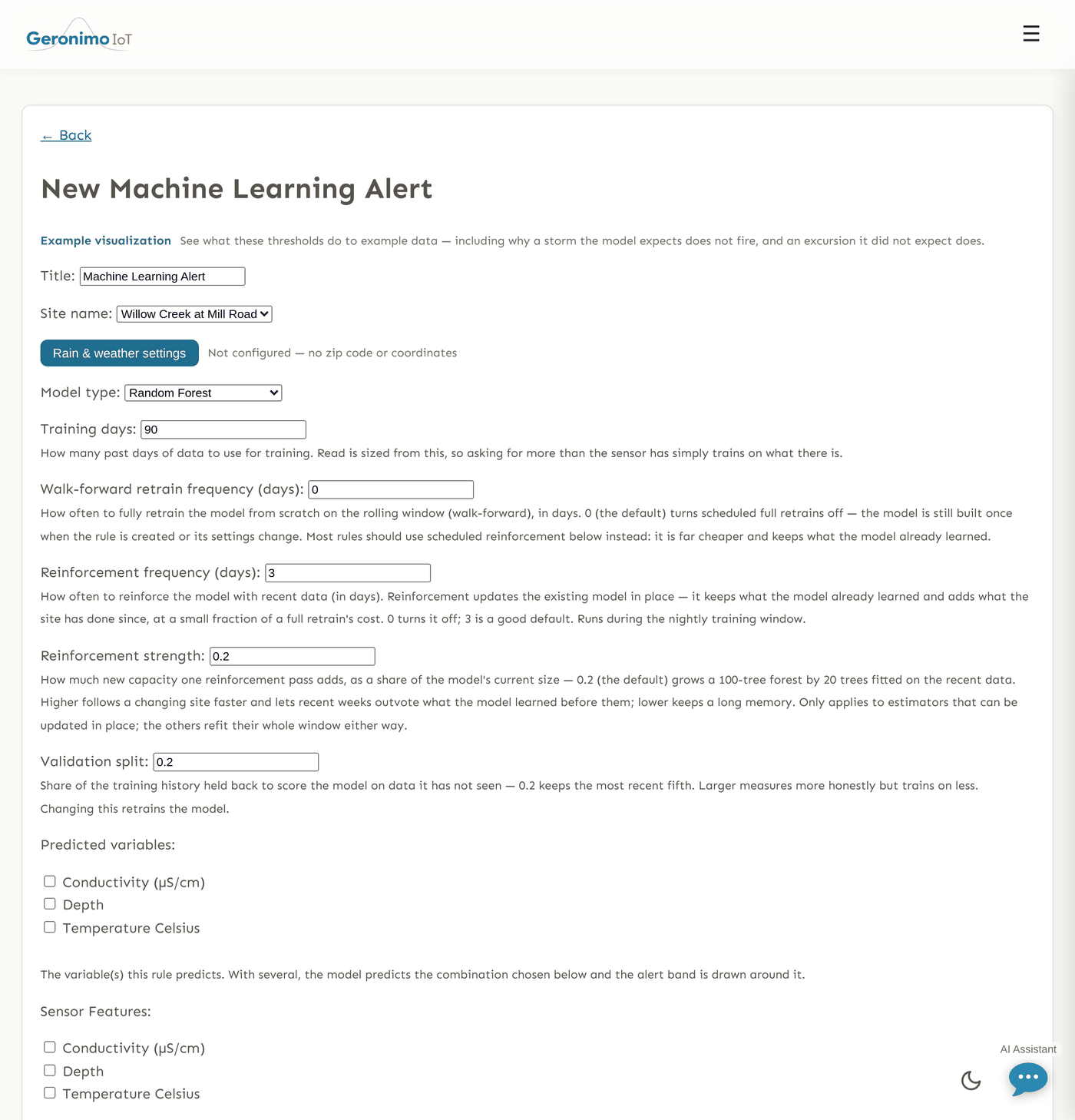
+ Create a New Alert on the Machine-learning alerts page opens the form. Above it, Visualize rule previews the thresholds on example data — useful for seeing why a storm the model expects does not fire while an excursion it did not expect does. The fields, top to bottom:
Site, location and model
| Field | What it does |
|---|---|
| Title | The rule's name, as shown on cards, emails and the alert log. |
| Site name | The sensor whose variables the rule predicts and reads from. The variable lists below narrow to this site once you pick it. |
| Zip code or coordinates | Optional. A zip code or latitude,longitude used to fetch weather. Weather is resolved to a 1–25 km grid cell, so precise coordinates add nothing. Needed for weather features and for the rain behaviour, since rain is looked up by location. |
| Model type | The estimator. Ten choices: Random Forest (the default), Extra Trees, Gradient Boosting, Hist Gradient Boosting, LightGBM, Ridge Regression, K-Nearest Neighbors, Support Vector Regressor, Multi-layer Perceptron, and Auto-select Best Model, which lets the search try every estimator and keep the best. Auto-select spreads the same trial budget over more candidates, so give it more trials or accept a rougher pick. Extra Trees is a Random Forest that also picks its split thresholds at random rather than searching for the best one: a little more bias for a lot less variance, which usually suits data with real measurement noise in it, and it fits faster for the same number of trees. LightGBM grows each tree leaf-wise instead of level-by-level and is generally the strongest of these on a few thousand rows — tune its Leaves per tree rather than its depth, which only bounds it. |
Training window and schedule
| Field | What it does |
|---|---|
| Training days | How many past days the model learns from (default 90, minimum 1). Asking for more than the sensor has simply trains on what exists. 90 days matches the default plot window on the analytics page, so what you see there is what a new rule trains on. |
| Walk-forward retrain frequency (days) | How often the model is thrown away and rebuilt from scratch on the rolling window, including a fresh hyperparameter search. Default 0 = off. The initial training and any retrain caused by a settings change are unaffected; this only controls the scheduled full rebuild. Most rules should leave it off and rely on reinforcement. |
| Reinforcement frequency (days) | How often the stored model is updated in place with the readings that arrived since it last learned (default 3; 0 turns it off). Reinforcement keeps what the model already knows, costs a small fit rather than a full search, and — because it scores the outgoing model on the new rows before learning from them — adds an honest out-of-sample measurement to the score history each time. See Reinforcement versus retraining. |
| Reinforcement strength | How much new capacity one pass adds, as a share of the model's current size. 0.2 (the default) grows a 100-tree forest by 20 trees fitted on the recent data. Raise it for a site that changes character between seasons — recent weeks then carry more of the vote; lower it to keep a longer memory. Only shown when reinforcement is on, and only meaningful for the estimators that can be updated in place: the others refit their whole window whatever this says. |
| Validation split | The share of history held back so the model can be scored on readings it never saw (default 0.2, allowed 0.05–0.5; the most recent slice is the one held back). Larger measures more honestly but trains on less. Changing it retrains the model. |
What it predicts, and from what
| Field | What it does |
|---|---|
| Predicted variables | Checkboxes over the site's variables. Tick one in the normal case. Tick two or more (up to 6) and the model predicts their combination rather than any single one; the first ticked is the rule's primary variable, which is what the alert log, the compound-alert picker and the status chip call it. |
| Combine variables as | Only shown with two or more predicted variables. Mean of the selected variables tracks the overall state; Maximum of the selected variables follows whichever is currently highest. The band is drawn around the combined series. Changing it retrains. |
| Sensor Features | The site variables the model may use as inputs (at least one). The target's own recent history is always an input. The search decides per training run which of these groups actually help and drops the rest — the detail page lists what was kept and what was dropped as unhelpful. |
| Features from other sensors | Variables from other sensors the model may learn from — an upstream gauge, the next logger on the creek. Choose a sensor in the dropdown, click Add sensor, then tick the variables you want from it; the list shows every variable that sensor reports. A rule on North Fork 0 can learn from North Fork 1 and 2 this way. Up to six other sensors and 24 borrowed series per rule; you can only add sensors you may read, and the rule's own sensor is never in the list (its variables are the row above). Each borrowed series is joined onto the rule sensor's timestamps (nearest reading within an hour) and becomes one more group the search may keep or drop; the detail page names them as Sensor · Variable. Changing this retrains the model. |
| Weather Features | Optional inputs from the forecast for the rule's location: Air Temperature (C), Humidity (%), Wind Speed (kph), Precipitation (mm), Cloud Cover (%), Pressure (mb). These sit inside the Rain & weather settings panel with the rain fields. |
| Look-ahead (hours) | How far ahead the model must predict (default 0, maximum 24). At 0 the newest input is the previous reading, so the model can track a slow drift instead of flagging it and the band never opens. A few hours forces it to predict from older information, which is what makes a gradual excursion visible — at the cost of a wider residual on quiet data. Changing it retrains. |
| Look-ahead applies to | Only shown when look-ahead is above 0. The predicted variable only — other sensors and weather stay current (default), Everything from this sensor — other sensors and weather stay current, Every sensor variable, borrowed ones included — weather stays current (it is forecast, so it is known ahead), or All sensor and weather variables. Weather is a forecast, so a real deployment does know tomorrow's rain today; hold it back only to see how the model does with no forecast at all. The middle option is the one for a rule that borrows variables from other sensors: every channel of the instrument being judged is held back with its target, while the borrowed series — a different instrument, still reporting — stay current. |
Hyperparameters
A collapsed Hyperparameters section sits below the excluded periods. Almost nobody needs to open it: the recommended parameters for your estimator are pre-ticked and everything else is pinned to a stated value. Inside it, Search trials is how many candidate models the search tries before picking one (10–200, default 50); more trials explore more and cost proportionally more on every retrain. Each parameter row has a checkbox (Hyperparameters to tune — ticked means searched over the range shown, unticked means fixed at the pinned value), an editable pinned value, and an editable sweep range, all clamped to the allowed span printed beside them. Fewer ticked boxes usually means a more reproducible model and, on a fixed trial budget, a better one, because the budget is shared with the variable-selection search. Only the group matching your Model type is used; Auto-select Best Model uses them all.
Two switches in the same section decide what a nightly retrain costs, and the search is about nine tenths of it. Warm-start from the last model (on by default) begins the search at the settings that won last time instead of at a random draw — it cannot make the result worse, because the search still explores the same ranges and still keeps whichever model scores best, and it usually gets somewhere good in far fewer trials. Turn it off if you want every retrain to search independently, for instance while comparing two nights' models. Measure a tree-count curve (off by default) is the answer to "how many trees does this rule actually need": switch it on and the next retrain also scores the model at 50, 100, 150, 200 and 300 trees on held-out readings from your own sensor, with the spread of those readings under each number, and the curve appears on the rule's model page under Trees against error. Two sizes whose ranges overlap are two sizes the measurement cannot tell apart, so you can drop Number of trees with something behind the decision. It costs about half an extra fit per retrain, so the usual pattern is to switch it on, read the curve once, and switch it off.
Excluded periods
Stretches the model must not learn from: a sonde out for calibration, known works upstream, a planned release. + Add period adds a row with two UTC date-times and a note; Pick on a chart opens the sensor's own readings so you can drag over the flat line where it came out of the water. When the rule borrows features from other sensors, the chart draws their ticked variables too, each panel labelled with its sensor, so a period is marked against everything the model will see. Editing the list retrains the model. Past periods can be left in place.
Careful. Excluded periods affect training only. The rule still evaluates and can still fire during one. If you also want it quiet, pause the rule (or use a static rule's skip windows for that behaviour — see the threshold page). An LLM alert's skip windows do both; these do not.
The band and when it fires
| Field | What it does |
|---|---|
| Threshold measured in | Standard deviations of the model's own error (the default): the bounds are multiples of the model's measured error σ, so 3 means "three times the error this model usually makes" on every variable. σ is measured in the same training run that builds the model, so a new rule has it as soon as it has a model. % deviation from the prediction: the bounds are a percentage of the predicted value, so 2 means very different things for pH and for conductivity — and can sit inside the model's own error (on one audited series the model's typical miss was 1.7 % of the value, so a ±2 % band would have paged on ordinary noise). The model's own predicted interval: the model is fitted with two extra models that predict the band's edges directly, so the band is wide when conditions make the reading genuinely hard to predict and narrow when they do not — where σ is one number measured at the last full training run and the same width in every condition. The thresholds keep their meaning as a multiplier: 1 is the interval as fitted, 1.5 is half again as wide. A rule switched to this band cannot fire until a training run has built the interval, and switching to it queues one. |
| Interval coverage (%) | Only shown for the predicted-interval band. How much of normal behaviour the interval should contain: 99 (the default) draws it to hold 99 readings in 100. Lower puts ordinary variation outside the band and the rule fires on the weather; higher asks the model to describe rarer conditions from fewer examples, which makes a noisier edge. Changing it retrains the model. |
| Minimum look-back coverage | How full the 24-hour look-back window must be before the rule trusts its features (0.5 = half the window holds readings; 0 turns the check off). Below the bar the rule does not fire: a reading outside the band shows as Outside band — waiting for data on the card, a reading inside it reads Normal. |
| Fire on a wide breach even when history is thin | Off by default. On, a reading beyond the band by more than the band's own width fires even while the look-back window is below the minimum coverage, and the alert's explanation says it fired on thin history and how thin. For sensors with patchy uplinks where a large excursion matters more than a clean model. |
| Measure σ robustly | Only shown for the standard-deviation band, and off by default. A standard deviation squares every miss, so a handful of fouling spikes inflate it — and since σ sets the band width, the spikes make the rule quieter exactly when the sensor has started misbehaving. This estimates σ from the median deviation instead, which a few outliers cannot move. On clean data the two agree, so turning it on does not shift a healthy rule's band. Worth pairing with a spike-resistant loss below, which deliberately leaves those spikes in the residuals. |
| Threshold upper / Threshold lower | The two bounds in the unit chosen above (defaults 3.0 and −3.0, i.e. three standard deviations of the model's own error). The preview button shows them on example data. |
| Σ window (hours) | Only shown for a stddev band. 0 (default) uses the σ measured when the model was trained — a fixed number describing how wrong it was on held-back data. A value recomputes σ from the model's own errors over that many recent hours, so the band adapts to current conditions. The trade: a degrading model gets a wider band and complains less about the thing that just went wrong, so prefer windows of a few days or more, and watch the score history. Very short windows (under a few hours, or fewer than 20 residuals) fall back to the training σ. |
| Min consecutive breaches | How many readings in a row must sit outside the band before the rule fires (default 1). One reading outside a model's band is ordinary prediction error; a run of them is a condition. The card shows a streak badge such as 2/3 when this is above 1. |
Rain & weather, quiet period, recipients
The Rain & weather settings button gathers the location, the weather features and the rain fields: Pre rain pause and Post rain pause (hours), Rain behavior — Skip alerts during rain or Use alternate thresholds during rain — and, for the second, Rain upper bound / Rain lower bound, which replace the deviation bounds while the rain window is active (a blank one keeps the normal bound on that side). They behave exactly as on the threshold kinds; see rain behaviour there. A model that has been given rainfall as a feature often needs no rain pause at all, because it expects the storm response — try the rule without one first.
Where the weather comes from
The weather is modelled, not measured. It comes from Open-Meteo, which is not a gauge network but an aggregator of numerical weather models and reanalyses. A rainfall figure here is a model's value for a grid cell — measured from this deployment on 2026-08-29, between 1.5 km and 13.5 km from the point you name, depending on the site and on which endpoint answered. That is fine for deciding whether a storm passed. It is not a substitute for a rain gauge, and it should not be reported as one.
A rule's weather is also spliced from two different systems. Anything older than about six days comes from the historical archive; anything newer comes from a forecast model's own recent past and its forecast. Those disagree: over 1–20 December 2025 at one Californian point, the archive's default gave 17.4 mm and the ERA5 reanalysis gave 11.2 mm for the same twenty days. The Rain & weather settings panel names both halves, and the rain chart on the period picker draws the join as a dashed line rather than hiding it.
Weather source chooses which model answers, and applies to both halves, so naming one makes a rule's history and its forecast come from the same place.
| Source | What it is | Grid | History from |
|---|---|---|---|
| Automatic (default) | Whichever model Open-Meteo judges best for the point — inside the US, NOAA HRRR at 3 km blending out to GFS. History is the ECMWF operational analysis, falling back to the ERA5 reanalysis for older years. | 2–25 km | 1940 |
| ECMWF IFS | The reference global model. Coarse, but the steadiest at multi-day lead times. | 25 km | 2024 |
| NOAA GFS / HRRR | HRRR at 3 km over the US for the first ~18 hours, blending into GFS. The finest grid available over the continental US. | 3–25 km | 2018 |
| NOAA HRRR 3 km | Convection-allowing, so it resolves the thunderstorm cell a 25 km model averages away. Refuses outside the continental US — a rule elsewhere set to this gets no weather at all. | 3 km | 2018 |
| DWD ICON | ICON-D2 at 2 km and ICON-EU at 7 km over Europe, blending into ICON global. The finest grid over Europe. | 2–11 km | 2023 |
| Météo-France AROME / ARPEGE | AROME at 1.5 km over western Europe, blending into ARPEGE. The highest-resolution model offered here, where it applies. | 1–25 km | 2024 |
| ECCC GEM | GEM-HRDPS at 2.5 km over North America. An independent second opinion against GFS on the same storm. | 2–25 km | 2023 |
| UK Met Office | UKV at 2 km over the British Isles, blending into the UM global model. | 2–10 km | 2022 |
| ERA5 reanalysis | Reprocessed rather than operational — the dataset a hydrology paper is most likely to cite. It does not forecast, so recent hours still come from the automatic source, and it lags real time by about six days. | 25 km | 1940 |
Leave it on Automatic unless you know your catchment. Models disagree by more than people expect — the same hour at the same point, on 2026-08-29, came back as 23.3 °C from the automatic choice and 27.9 °C from global GFS. Automatic is also the only option whose archive reaches back to 1940, which matters for a rule that trains on months of history: pick a model whose archive starts after your training window and the older part of that window falls back to Automatic anyway, which the panel tells you it has done.
Changing the source changes what the rule decides on, so it is part of the rule's version stamp: a firing recorded before the change and one recorded after are not comparable, and the history says which was which.
Hours between alerts is the quiet period after a firing (default 1; 0 notifies on every breaching cycle), and the recipient fields and No recipients — show in the app only work as on every kind — see the overview.
After you save: the model's own status
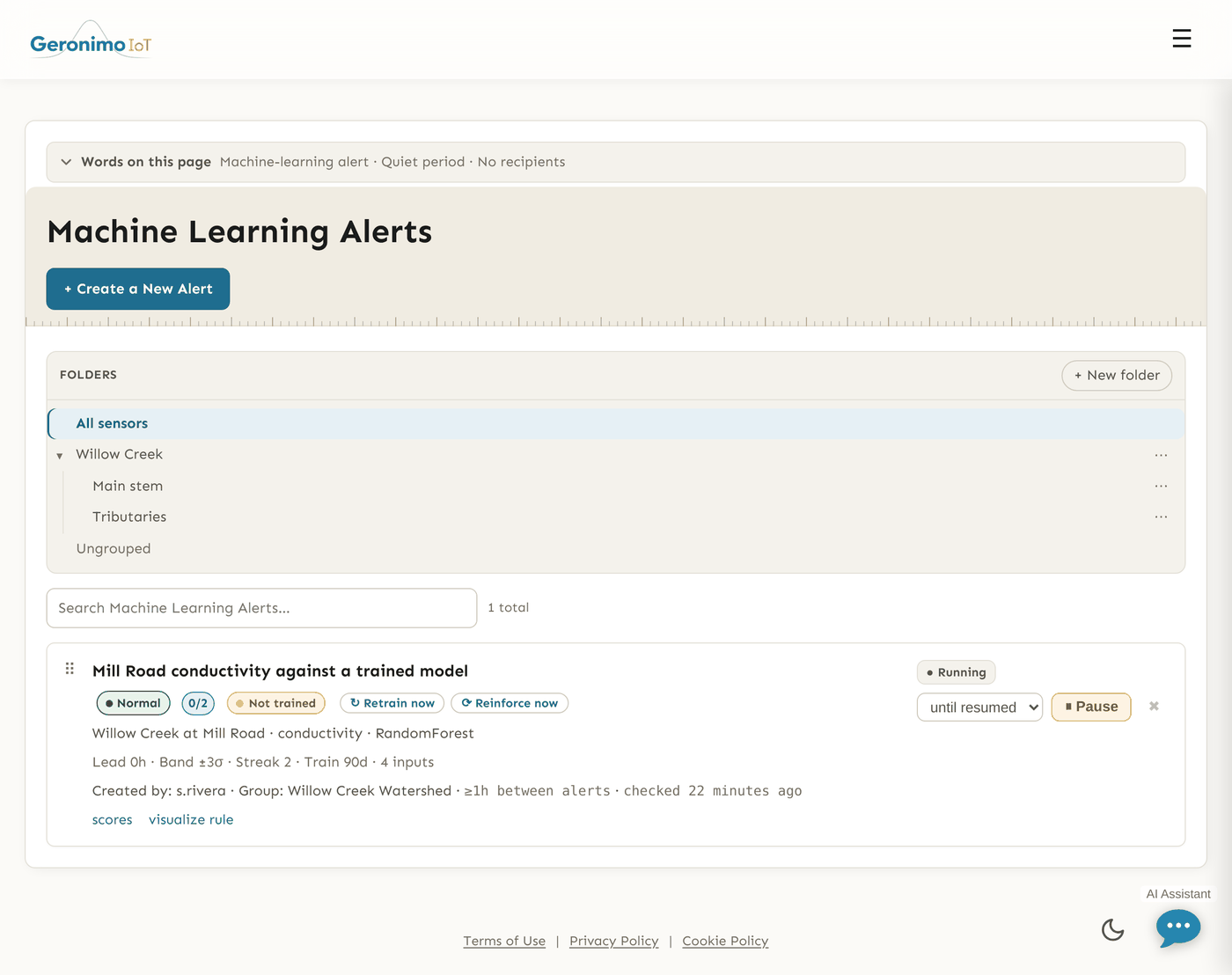
Saving a new rule queues its first training immediately and the page says so ("Training this rule's model now — it will start evaluating once the first run finishes"). Editing an existing rule retrains only when you changed something the model is made of (model type, variables, features, look-ahead, excluded periods, training days, the split, the aggregation); changing thresholds, streak, rain or recipients does not, and saving a rule with nothing changed does nothing. To ask for a run without editing anything, use the two buttons on the rule's card: ↻ Retrain now rebuilds the model from its full training window, and ⟳ Reinforce now (shown when the rule has a reinforcement frequency) updates the stored model with recent data, which is cheaper. One run per rule is in flight at a time and the model chip follows it. Otherwise the scheduled training job — one task per rule, run one at a time on its own queue with a one-hour limit each — handles reinforcement (every 3 days by default) and walk-forward retrains, and rebuilds any model whose settings no longer match. A model is also rebuilt after a deploy that changes how features are computed (the bundle's feature version no longer matches the code), so after such a deploy every ML rule shows Retrain due until its turn comes. Under thin data — the look-back window less than half full after an outage — the evaluator reports a thin verdict rather than firing, unless the rule opts in to firing on a wide breach anyway.
Each card on the list carries two chips. The first is the usual alert state (Normal, Alerting, and so on). The second is the model chip, which updates live while training runs:
| Chip | Meaning |
|---|---|
| Not trained | No model yet, so the rule never fires. The scheduled run will build one; Retrain now on the card asks for it now. |
| Retrain queued / Training… | A run is waiting for a worker, or running. The rule starts evaluating against the new model as soon as it finishes. |
| Retrain due | The rule's settings changed since its model was trained, so the stored model is not being used; the nightly run rebuilds it. |
| Retrain failed (×N) | The last attempt raised, with the reason in the tooltip and how many in a row. The rule is not using a model built from its current settings until a run succeeds. |
| Trained 3d ago / Reinforced 1d ago | Healthy. The chip names the most recent update of either kind, because a rule on the default schedule is kept current by reinforcement and never fully retrained — the tooltip gives both clocks and when the next pass is due. |
| Model 9d ago | Nothing is reaching this rule: its model has gone longer without an update of either kind than its own shortest enabled frequency. |
| Reinforcement stalled | A boosting model has reached its stage cap, so every further pass measures it and teaches it nothing. It is not degrading, but it has stopped learning — only a full retrain moves it now. |
Spikes, losses and the band
Every tree estimator now offers a spike-resistant alternative to its default loss — huber or absolute_error for Gradient Boosting, huber or regression_l1 for LightGBM, and an absolute_error split criterion for the two forests. A fouled or stranded sonde writes spikes, and a squared-error model chases them: it spends its capacity fitting the fault instead of the creek. On test data with 2% spiked training rows, error on the clean data fell from 1.69 to 0.75 with huber and to 0.36 with absolute error.
There is a catch, and it is worth understanding before you tick one. A robust model stops bending to fit the outliers, so the outliers stay in its residuals at full size and the measured σ goes up — in that same run, from 2.11 to 3.84. A standard-deviation band widens with it, so a better model would end up alerting less. Two ways through: turn on Measure σ robustly, which estimates σ from the median deviation and is unmoved by the spikes, or use the predicted interval band, which never reads σ at all. The absolute-error split criterion on a forest is also substantially slower than the default, because every candidate split has to sort rather than accumulate.
Reinforcement versus retraining
A walk-forward retrain discards the model and re-runs the full search on the rolling window. It is the right tool when the rule's definition moved and an expensive one when only the calendar did, which is why its schedule defaults to off.
A reinforcement pass takes the stored model and the readings that arrived since it last learned (at least 20 new rows, otherwise it waits for the next night), and does two things in order. First it measures: the outgoing model is scored on the new rows, which it has never seen, and that score joins the history marked as a reinforcement measurement. Then it updates in place, in the way each estimator allows:
- Multi-layer Perceptron — the network takes extra gradient steps on the new rows (partial fit).
- Random Forest and Extra Trees — new trees are fitted to the new rows and appended; past 500 trees the oldest are dropped, so the forest slides forward through time instead of growing without bound.
- LightGBM — further boosting rounds are fitted against what the existing trees still get wrong on the new rows, and appended to the booster. Trees cannot be removed, so growth stops at 1,000.
- Gradient Boosting and Hist Gradient Boosting — extra boosting stages are fitted against the new rows' residuals. Stages cannot be removed, so growth stops at 1,000; the model still measures and stamps.
- Ridge Regression, K-Nearest Neighbors, Support Vector Regressor — these have no incremental mode, so the same winning configuration (estimator, hyperparameters, selected features) is refitted over the whole window with no search. That is a cheap walk-forward rather than true reinforcement, and because it really is a fit from scratch it stamps the trained clock, not the reinforced one — so a rule on one of these reads as freshly trained, which it is.
The scaler and imputer are frozen on the incremental paths, so the new trees or steps see the same transformed inputs the old ones were built on.
Checking the model: scores, residuals, detail page
On each card, scores opens a Model accuracy popup with two tabs, and visualize rule draws the sensor's readings against the predicted band.
Score history
One row per training or reinforcement run, newest first: Measured (when, with in use on the row that produced the current model and optimistic on a run that had too little history to hold back an untouched split, so its score is an upper bound), Model, Typical error (RMSE), Change against the run before, Beats doing nothing by (skill against simply reusing the last reading; n/a when the series barely moved), Spread (residual σ), Readings tested on and a plain-English Verdict. Lower error is better. The popup also charts the RMSE over time against the band width, and the residual distribution per run, so you can see the error move between retrains.
Residuals
The Residuals tab re-runs the model over a recent window (24 hours to 30 days) and plots, per reading, what the model expected, what the sensor reported, and the gap, with the rule's band drawn with the same arithmetic the evaluator uses — so a residual leaving the band is a firing, subject to the streak. An RMSE of 0.14 might be 0.14 everywhere or perfect all week and 3.0 out every afternoon; this is how you tell.
The detail page
Linked from inside the scores popup, the rule's detail page has a Model panel (estimator, when trained, the retrain and reinforcement cadence, how many features, the variables kept and the ones dropped as unhelpful, typical error against reusing the previous reading, how many readings it was measured on, an Accuracy verdict, an Alert band note on how the band compares with the error, and a Drift line when recent errors have widened relative to training — a prompt to retrain) and the full Score history table. A rule with no model says so; a model built by older feature code is reported as stale and rebuilt on the next run.
Tips and pitfalls
- Give it time and data. A model trained on a fortnight of one season will complain all winter. Check Readings tested on and the verdict before trusting a rule.
- Percent first, σ later. A stddev band is the better statement of "unusual for this model" but needs a measured model; start in percent, read the band note on the detail page, then switch.
- Set a look-ahead for slow drifts. At 0 a model that sees the previous reading will happily follow a creeping sensor fault. A few hours of look-ahead is the setting that catches it.
- Excluded periods do not silence the rule. They shape training only; pause for field work.
- Watch the model chip. A rule can read Normal for a week while Retrain failed ×4 sits beside it; the first chip is about the creek, the second about the thing judging it.
- A worse score after a change is information. The Change column compares each run with the one before; a retrain that got worse usually means the site changed or a chosen variable stopped helping.
- Anyone with read access can open the form to see a rule's configuration and use the chart tools; only the save needs edit rights.