
Data quality & products
Rating curves
Turn a stage record into discharge: curve types, shifts, discharge measurements and backfills.
When to use rating curves
A pressure transducer or staff gauge records stage — how deep the water is. What most people want is discharge: how much water is going past. The Rating curves section turns one into the other. You describe the stage–discharge relationship for a sensor (a fitted power law, a lookup table, a weir formula…), and Geronimo IoT computes a discharge series from every stage reading, keeps it up to date as new readings arrive, and carries the stage record's quality flags across so that a bad depth never becomes a good flow.
The section also holds the two things a gauging record needs around the curve itself: a shift history, for when the channel control moves but the rating still holds, and a log of field discharge measurements, which is the evidence the rating is judged against.
Note. There is no automatic fitting solver. You type the coefficients you fitted elsewhere (or the standard weir constants), preview the curve, and check it against your measurements; the page tells you how far each measurement sits from the curve and what shift would reconcile them.
The landing page
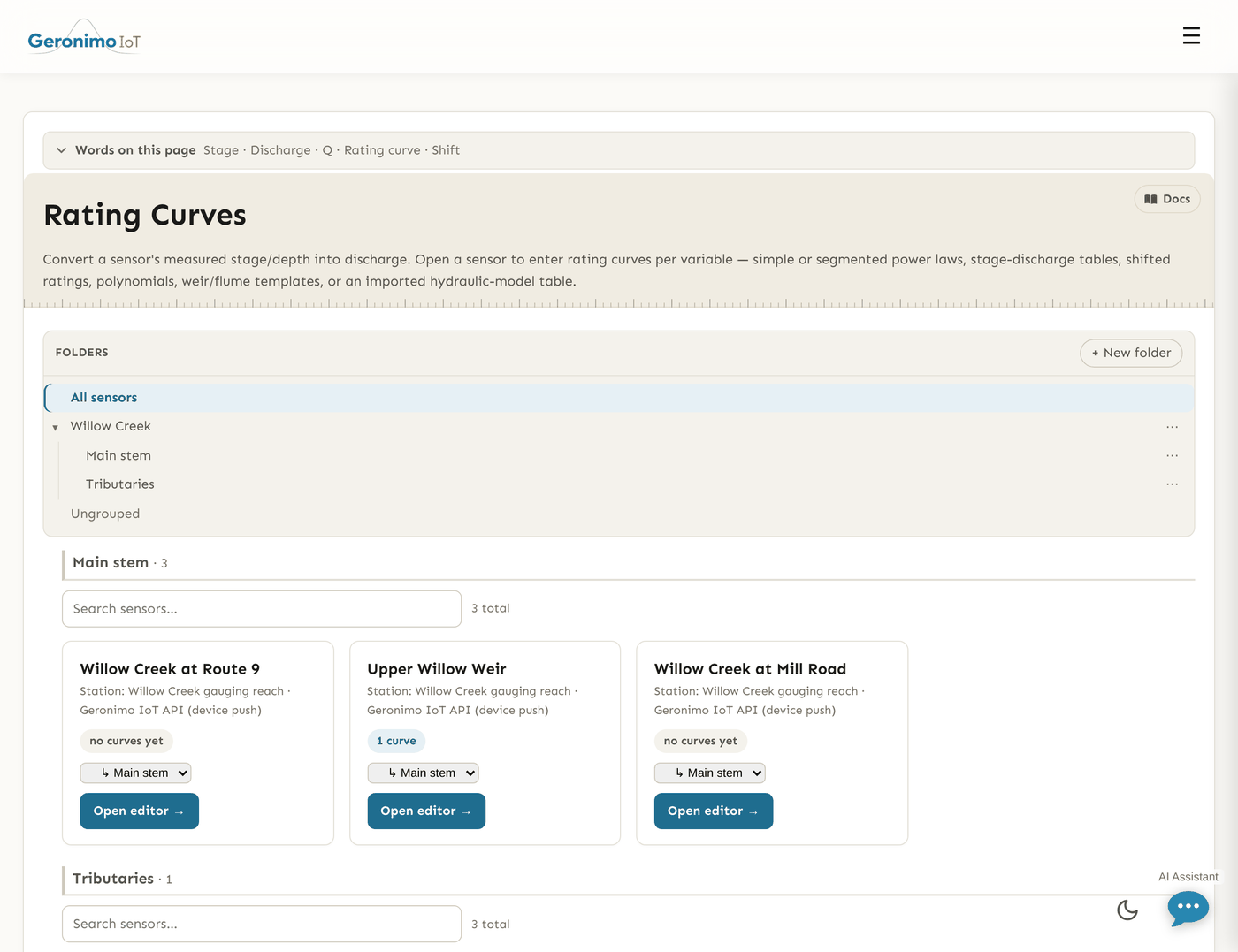
Rating curves lists your accessible sensors grouped by folder, with the usual folder and group filters. Only sensors that can be rated appear: those recording a stage-like variable — one mapped to a water-level observed property, or failing that one whose name or label contains depth, stage, height, level, head, gage, gauge or wse, or whose unit is a length — plus any sensor that already has curves, which stays listed whatever happened to its variables. Each card shows N curves or no curves yet and an Open editor → link. If a sensor you expect is missing, give its water-level variable an observed property or a length unit on the Settings page.
The curve editor
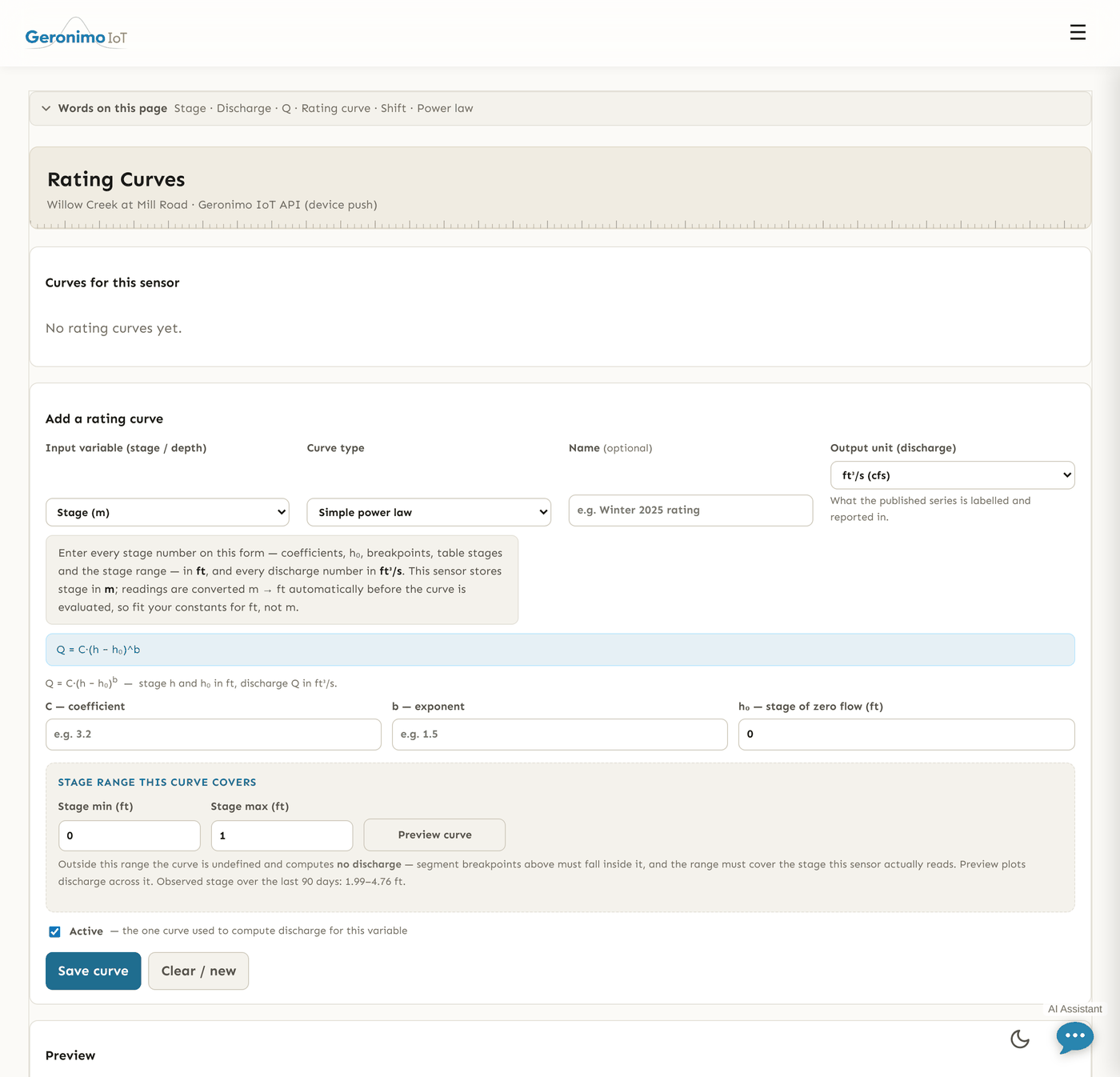
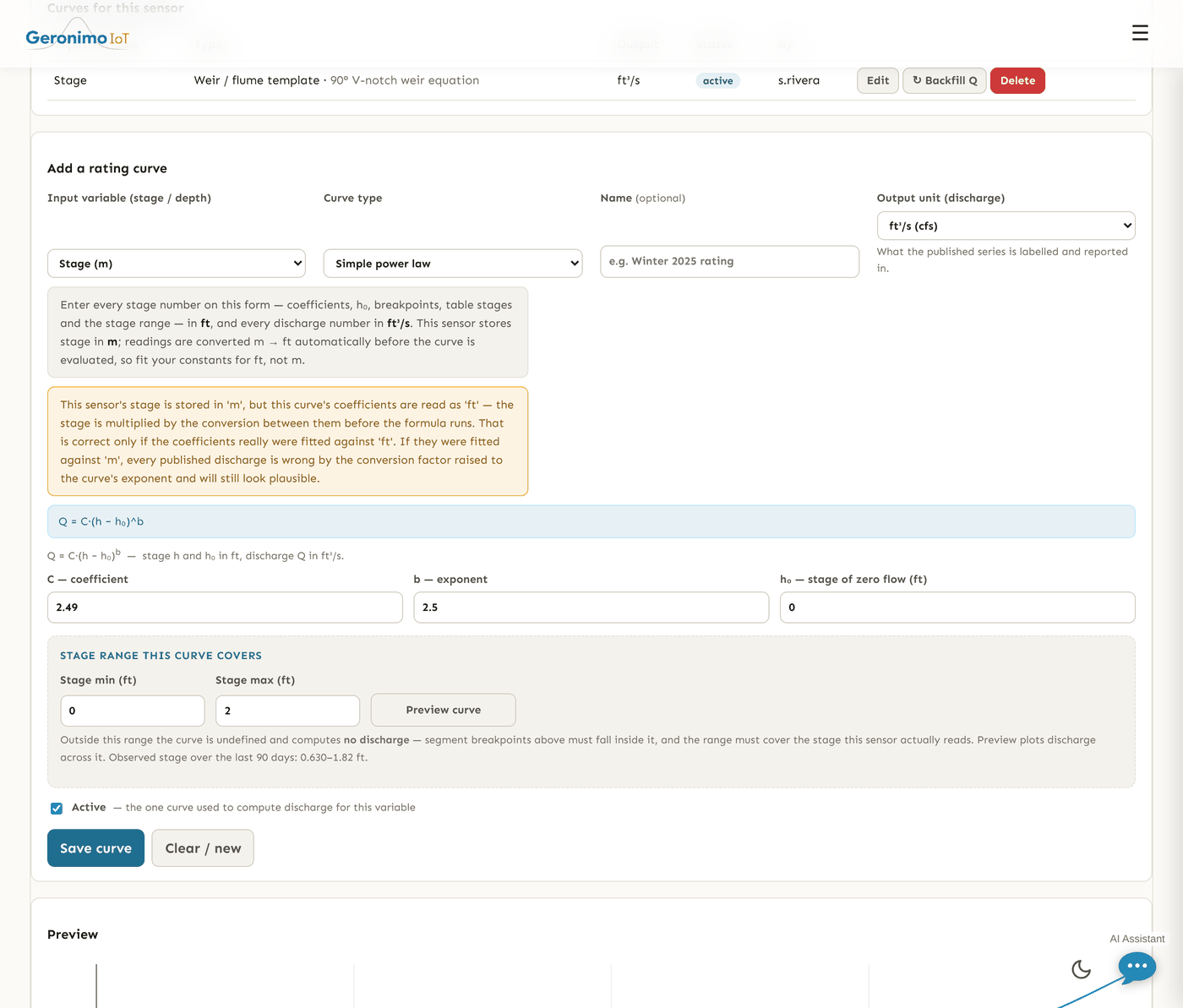
The workbench opens with Curves for this sensor (every curve, with Edit, ↻ Backfill Q on the active one, and Delete) and the editor below it. Members with read-only access to the sensor see everything but the controls are disabled.
| Field | Meaning |
|---|---|
| Input variable (stage / depth) | The stage series the curve reads. Only stage-like variables are offered, stage first; a variable an existing curve, shift or measurement already names stays listed. |
| Curve type | One of the eight types below. The parameter fields change with it and a one-line description of the formula appears under the selector. |
| Name (optional) | A label such as "Winter 2025 rating", shown in the curve list. |
| Output unit (discharge) | What the published series is labelled and reported in: ft³/s (cfs), m³/s (cms), L/s, gal/min (gpm), Mgal/d (MGD) or acre-ft/day. This choice also decides the unit system your coefficients are read in (next paragraph). |
| Parameters | The type's coefficients, segments or table — see the curve types. Every label carries the unit its number must be in. |
| Stage min, Stage max | The range of stage the curve is valid for. Outside it the curve is undefined and computes no discharge. Segment breakpoints must fall inside it, and it must cover the stage the sensor actually reads; the hint beneath reports the observed stage over the last 90 days in the curve's head unit so you can check. |
| Preview curve | Evaluates the unsaved parameters across the stage range and plots discharge against stage, saying how many of the sample stages produced a value. Nothing is written. |
| Active | The one curve used to compute discharge for this input variable. Saving a curve as active deactivates any other active curve on the same variable; exactly one curve drives discharge per variable. An inactive curve is kept but computes nothing. |
| Save curve, Clear / new | Save validates the parameters, stores the curve, and — if it is active — rebuilds the discharge series across full history. Clear / new empties the form for a fresh curve. |
Units are derived automatically
A rating's coefficients are only valid for one head unit, and a sensor stores stage in whatever its logger writes — often millimetres. Rather than ask you to declare fit units, the editor derives them from the output unit: an imperial discharge (ft³/s, gal/min, Mgal/d, acre-ft/day) means every stage number on the form is in ft; a metric one (m³/s, L/s) means m. The note above the parameters states this contract and, when the sensor stores stage in a different unit, says that readings are converted before the curve is evaluated — so fit your constants for ft or m, not mm. The same message pops up whenever you change the variable or the output unit.
After a save or preview the server may add a warning banner: a weir coefficient that belongs to the other unit system, a head unit that looks wrong by a power of ten, a stage range that misses most (or all) of the observed record, or a curve activated by someone without Settings rights, whose discharge series stays hidden on the sensor's pages until someone with those rights shows it. Read it — it is the one place that says a saved curve may be publishing a wrong number.
The eight curve types
In every formula h is the (converted, shifted) stage and Q the discharge in the curve's fit units.
| Type | Formula and parameters |
|---|---|
| Simple power law | Q = C·(h − h₀)^b. Fields C — coefficient, b — exponent, h₀ — stage of zero flow. At or below h₀ the flow is zero. |
| Segmented power law | One power law per stage range. Each segment has From stage ≥, C, b and h₀; a segment applies at or above its from-stage and the highest one at or below the reading wins. Below the lowest segment the rating is undefined. + Add segment adds a row. |
| Stage-discharge table | One stage, discharge pair per line; discharge interpolates linearly between listed stages and is undefined outside them. At least two pairs, no duplicate stages. |
| Shifted rating (power + shifts) | Q = C·(h + shift − h₀)^b: the power law with a Datum shift built into the curve, and an optional Stage-varying shift (pairs of stage, shift, interpolated and held flat beyond the ends) that overrides the constant. This composes with the separate shift history below, so prefer one or the other per series. |
| Polynomial equation | Q = c₀ + c₁·h + c₂·h² + …. Coefficients listed lowest power first, comma or newline separated. |
| Weir / flume template | Pick a Template: Rectangular weir — Q = C·L·h^1.5 and Cipolletti weir — Q = C·L·h^1.5 take L — crest length and C; V-notch weir — Q = C·tan(θ/2)·h^2.5 takes the Notch angle θ (90 is standard) and C; Parshall flume — Q = C·h^n takes the throat C and n from the flume's own rating. The standard coefficients are named on the labels — rectangular 3.33 (ft) / 1.84 (m), Cipolletti 3.367 / 1.86, V-notch 2.49 / 1.38 — and a save is refused if a standard coefficient belongs to the other unit system than the output you chose. Head at or below zero gives zero flow. |
| Hydraulic-model table import | Same maths as the stage-discharge table (one pair per line, linear interpolation); the distinct type marks that the points came from a hydraulic model. |
| Piecewise — different model per stage range | A compound rating: each From stage ≥ segment has its own Model — any of the types above except piecewise itself — and that model's parameters. The highest segment at or below the reading is evaluated; below the lowest the rating is undefined. + Add stage segment adds a row. |
Lists (segments, coefficients, table points, shift points) are limited to 1000 entries each.
The derived discharge series
An active curve writes its discharge under a new variable on the same sensor named <input>_Q — a depth column called Meter_Hydros21_Depth yields Meter_Hydros21_Depth_Q, labelled "Discharge (<input>)" with the output unit and the discharge observed property. It is an ordinary variable from then on: it can be plotted on the analytics page once its Plot box is ticked on the Settings page (activating a curve ticks it for you when you hold Settings rights), it appears as a panel in the sensor's Data quality workbench, and it can be included in any export.
Discharge is computed from the corrected stage, inherits each stage reading's quality flag (a failed depth is a failed flow; a deleted depth is a missing flow), and can carry its own range test on top in the Data quality workbench. A stage value outside the curve's stage range, or below the lowest segment, produces a missing discharge rather than a guess. Discharge derived from a gap-filled stage point is marked interpolated, like the fill itself. An approved review period on the discharge series freezes those values even as the stage is re-graded around them.
Whenever the stage is re-graded, corrected or gap-filled in the Data quality workbench, the discharge for the same span is rebuilt automatically. Deactivating or deleting a curve retires its discharge series; Delete warns that every reading of the published series goes with it, and is refused while an approved review period covers that series.
Backfill
↻ Backfill Q on the active curve recomputes the discharge across full history — for stage imported or corrected since the curve was last saved, or a rebuild that was lost. The page says whether the rebuild was queued (the series updates when the worker finishes) or ran immediately. Because a full rebuild is real work on a long series, it is rate-limited to 12 per hour per account (your administrator can change this), at most two may run at once server-wide, and a second rebuild of the same series while one is running is refused rather than stacked.
Shift history
A shift corrects the stage before the curve is evaluated — Q(t) = curve(h(t) + shift(t, h)) — for when the control moves (gravel builds, the weir silts, the bed scours) but the rating itself still holds. Shifts attach to the input variable rather than to a curve, so the history survives the curve being replaced: the shifts describe the channel, the curve describes the rating.
| Field | Meaning |
|---|---|
| Input variable | The stage series the shift applies to. |
| Constant shift | The same correction at every stage, in the stage variable's units. |
| Effective from (UTC), Effective to (UTC) | When the shift is in force; a blank end means still in effect. Where shifts overlap, the one with the later start wins. |
| Stage-varying shift | Optional JSON pairs of [stage, shift], e.g. [[0, 0.4], [5, 0]], which override the constant. Between listed stages the shift interpolates linearly; beyond either end it is held flat. This is the usual case — a low-flow control fills in while the high-flow section is untouched, so the shift tapers to zero with stage. |
| Note | What moved and why. |
Save shift stores it and re-materialises the discharge over the span it covers, across full history; Edit and Delete on a listed shift do the same. The list shows each shift's span, its value (or stage-varying with the pairs), note and author.
Discharge measurements
Field measurements are the evidence the rating is judged against: someone wades the section or runs an ADCP, records the stage and the discharge, and the pair is compared with what the rating says the discharge should have been. A run of measurements drifting the same way is the signal that a shift is due.
| Field | Meaning |
|---|---|
| Input variable | The stage series the measured stage belongs to. |
| Date / time (UTC) | When it was measured. |
| Gage height (stage) | In the variable's stored unit, as the chart and the data show it — the hint beside the field names it. |
| Measured discharge | In the active curve's published unit; the hint names that too. Cannot be negative. |
| Method | Wading — current meter, ADCP / acoustic, Dye or salt dilution, Volumetric / timed container, Portable weir or flume, Other. |
| Quality | Excellent — within 2%, Good — within 5%, Fair — within 8%, Poor — worse than 8%. |
| Measurement no., Party, Notes | Optional: the field-sheet number, who measured, conditions. |
Measurements never change the discharge series. In the list each one is served with the rating's own answer beside it: Rated Q is what the active curve, with whatever shift was in effect at that instant, gives for the measured stage; Diff is the percent difference (measured minus rated, over rated), coloured green within 5%, amber within 8%, red beyond; Shift to fit is the total shift that would make the rating reproduce the measurement — what the shift in effect should be changed to, not added to — or a dash when no shift within reach explains it, which is a prompt to rebuild the rating rather than to shift it. These columns are recomputed on every load from the curve and shifts as they stand now, never stored, so they cannot go stale when a curve is edited. A variable with no active curve shows no active curve instead.
Versions and the change history
Every save that changes a curve's maths (type, parameters, input or output) appends an immutable version snapshot, and every shift save does the same; a save that only renames or toggles Active does not. Because the raw stage is never altered, any past discharge can be reconstructed by replaying the version that produced it. These snapshots are kept for provenance and are not shown on the page.
Creating, editing, activating and deleting curves, saving and deleting shifts, running a backfill, and adding, editing or deleting measurements are all filed in the sensor's Data quality change history, tagged rating, with who did it and when — including a curve, shift or measurement you confirmed from the assistant, which is filed the same way and under your name, because the door a change came through does not change what it did. Unlike QC edits they carry no Revert button: there is no rating undo to offer, and a deleted discharge series cannot be restored from the history list.