
Alerts
Compound alerts
Combine other rules with AND / OR and fire only when the combination holds.
When to use a compound alert
A compound alert has no threshold of its own. Its condition is other rules: it fires when a combination of static, moving-average and machine-learning rules you already have is true at the same time. "Depth is high" pages on every storm; "depth is high and conductivity is normal" pages on the one that is not just rain. "Turbidity high at the upstream site or at the downstream site" pages once for either. Whenever you find yourself wanting a rule that pages less than its parts, or one rule that watches several sensors, this is the kind.
Prefer a single threshold rule when one variable on one sensor is the whole condition, and a LLM alert when the combination is too fuzzy to write as AND/OR. Recipients, pause and resume and the alert log are shared with every kind and are described on the alerts overview. Rules live under Compound Alerts.
The shape of a condition
A condition is a list of groups (the form calls each one a bracket). Inside a group, the member rules combine with either ANY of these (OR) or ALL of these (AND). Between groups, Combine groups with is either ALL of the groups must be true (AND) — the default — or ANY group being true is enough (OR). Two levels, each with its own operator, cover what people actually ask for without an expression parser or a precedence rule anyone has to remember:
- groups combined with ALL, each group ANY: a AND (b OR c)
- groups combined with ANY, each group ALL: (a AND b) OR (c AND d)
Deeper nesting — a AND (b OR (c AND d)) — is deliberately not supported, and a compound cannot be a member of another compound: the picker offers static, moving-average and machine-learning rules only. LLM alerts are excluded too, because a compound asks each member for its live state on every evaluation and an LLM rule's state costs a paid API call. If you genuinely need a deeper expression, build the outer clause as a static or moving rule's own streak or clear bound where you can, or split it into two compound rules with their own recipients.
Stored, a condition is a list of brackets such as {"op": "any", "refs": ["static:12",
"moving:4"]}; the builder writes that for you. Up to 20 groups of up to 20 rules each.
Creating a rule
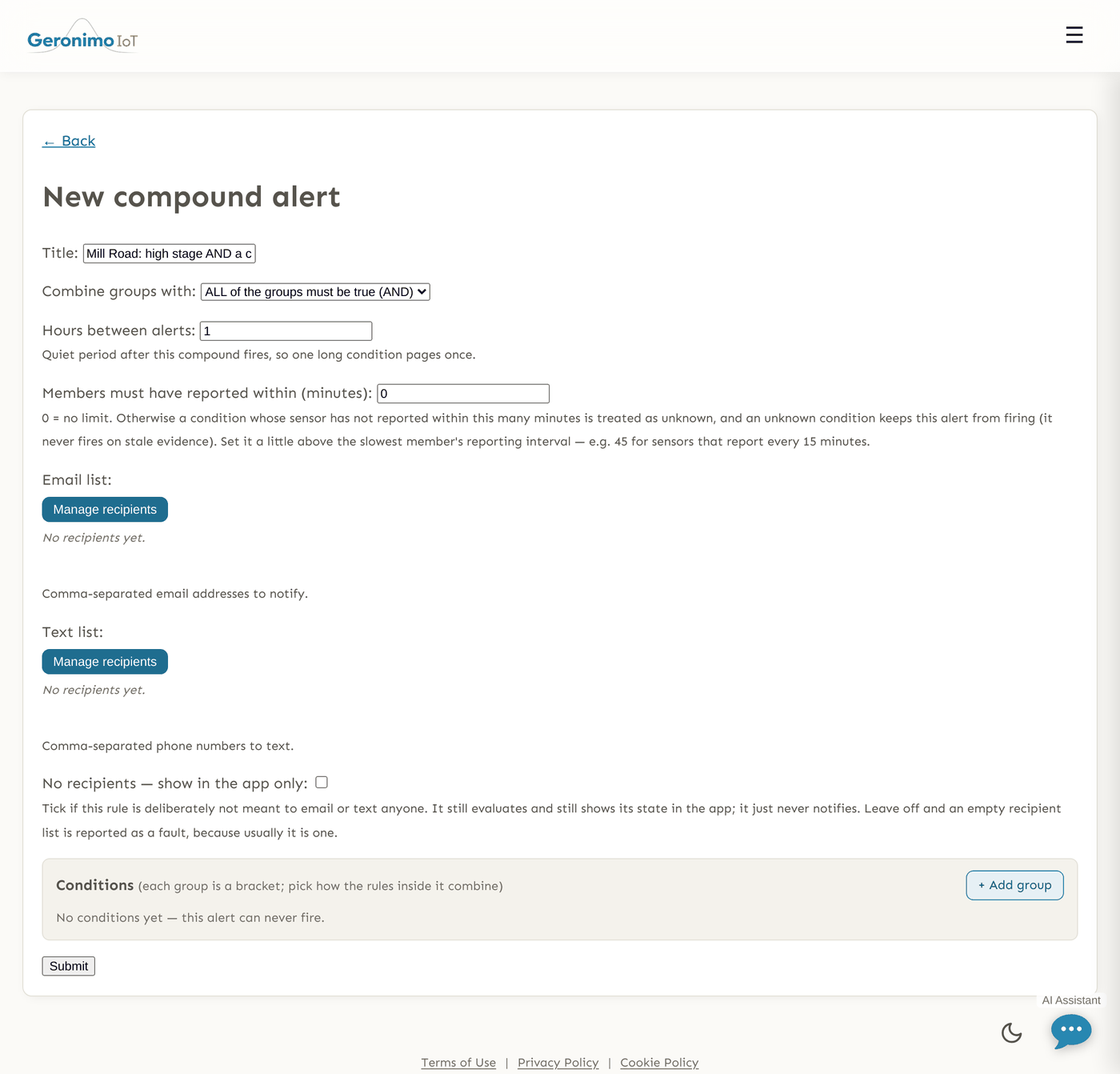
+ Create a Compound Alert on the Compound Alerts page opens a short form:
| Field | What it does |
|---|---|
| Title | The rule's name; it is also the subject line of the alert ("Compound alert: <title>"). |
| Combine groups with | ALL of the groups must be true (AND) or ANY group being true is enough (OR). The word between groups in the builder changes as you switch it. |
| Conditions | The builder, described below. With no conditions the form shows No conditions yet — this alert can never fire, and that is exactly what happens. |
| Members must have reported within (minutes) | 0 (default) puts no limit on how old a member's evidence may be. Set it and any condition whose sensor has not reported within that many minutes counts as unknown — and an unknown condition keeps the compound from firing, the same way missing data does. Use it when members report on staggered schedules and you do not want "A AND B" held true by a B whose logger went quiet; a little above the slowest member's interval (45 for 15-minute sensors) is the usual value. |
| Hours between alerts | Quiet period after this compound fires (default 1; 0 pages on every cycle the condition holds) — see below. |
| Recipients | Email list, Text list and No recipients — show in the app only, as on every kind. A compound has its own recipients; it does not inherit its members'. |
The condition builder
- + Add group adds a bracket. Its header is a select — ANY of these (OR) (default) or ALL of these (AND) — and an × to remove the whole group.
- Each group starts with one empty slot reading Choose a rule…. Click it to open the Choose a rule picker: a search box (rule name, site or variable), filter buttons All / Static / Moving / Machine learning with counts, and a folder dropdown (All folders, Ungrouped, or a folder path). Every rule you are allowed to read is listed, labelled with its site, variable and kind. Click one to fill the slot.
- + OR another rule adds another slot to the group (the connective shown between slots follows the group's operator). × beside a slot removes it.
- Between groups the builder prints AND or OR according to Combine groups with.
A member you are not permitted to read is refused on save ("One of the selected rules is not available to you"), and an empty group is dropped rather than saved, because an empty AND term is always true and an empty OR term always false. A slot whose rule has since been deleted shows as (unavailable) in the form and (deleted) on the card.
Weather conditions
A group can hold a + weather condition beside its rules: a test on the recent hourly weather at a location — Rain total > 2 mm over the past 24 h at 94704, Air temperature minimum < 0 °C over 12 h, Wind speed maximum ≥ 40 kph over 6 h. Pick the metric (rain, air temperature, humidity, wind speed, pressure, cloud cover), how to reduce the window (total, maximum, minimum, average, or the latest hour), the window in hours (1–72), the comparison and the number, and a zip code or latitude,longitude. Weather is Open-Meteo's and is modelled, not measured — a weather model's value for a 1–25 km grid cell some kilometres from the point you give, not a gauge reading (what that means). It is read at most once every fifteen minutes per location however often the compound is checked. A condition whose weather cannot be read is unknown, never true — the same stance as a member rule with no data — so an outage cannot fire an AND on silence. The card shows what the weather said at the last check beside the condition.
How it is evaluated
Compound rules are judged at the end of every evaluation pass, after the static, moving and machine-learning rules have been. For each member the compound first looks for the verdict the engine actually reached this cycle — including things a fresh look could not see, such as a static rule still firing inside its clear band — and uses that. A member that produced no verdict this cycle (most often because it is in its own quiet period, which makes the engine skip it) falls back to its live status: the same answer its own card shows. So a compound keeps working while its members cool down, and the compound's card can never disagree with the members' cards.
Uncertainty does not fire. A member that cannot be judged — no data, no trained model yet, a deleted rule — makes its group unknown. An OR group with one firing member still fires; an AND group with one quiet member is still quiet; otherwise an unknown member makes the group unknown, and an unknown group makes the whole compound Unknown rather than Normal or Alerting. A compound exists to page less than its members, so silence on missing evidence is the direction that matches why it was written — and the card says so rather than showing green.
When the condition is true, the rule fires once and then serves its quiet period. Recipients get one email or text with the compound's title; an Alerting card and an entry in the alert log follow as for any kind. A compound that fires with nobody to notify and without No recipients — show in the app only ticked is recorded in the alert log as having paged nobody and reported as a fault; it still serves its quiet period. If a delivery genuinely fails, the quiet period is released so the next pass can retry.
Quiet period and cadence
Hours between alerts is the compound's own clock. A member's quiet period governs how often that rule pages, not whether its condition is true — so a compound with a shorter quiet period than its members keeps paging while the combination holds, and one with a longer period pages less than any member. There is no incident tracking for compound rules (an incident is keyed to one site and one variable, and a compound may span several), so one long condition pages once per quiet period, like any rule in cooldown mode. While it is serving a quiet period the card reads Cooling down with when it fired and when it may fire again, and end quiet period re-arms it immediately.
What the list shows
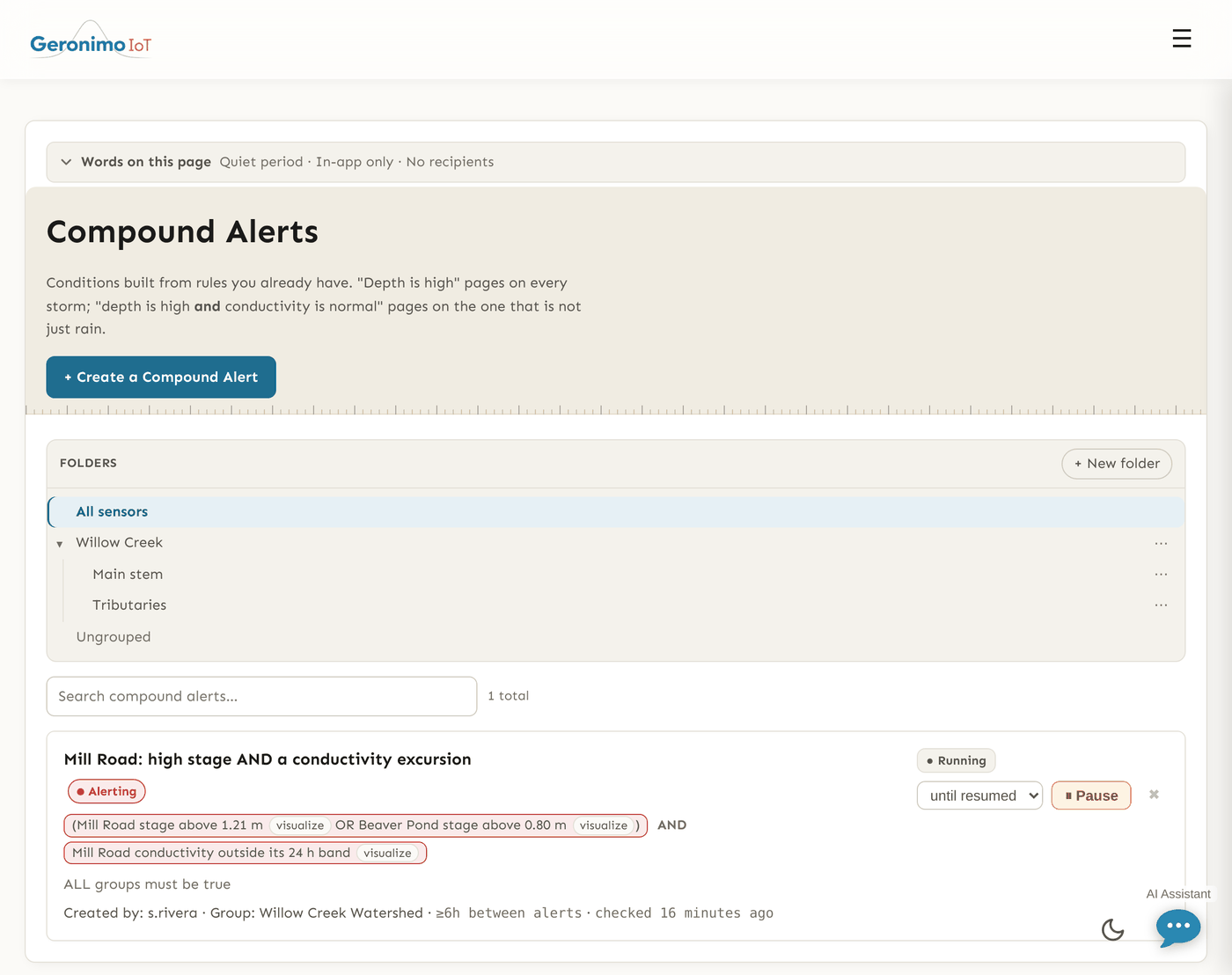
There is no separate detail page; the card on the Compound Alerts page is the rule's status. Each card shows the title (a link to the edit form), the state chip — Alerting, Normal, Unknown or Not configured, with a tooltip that says why (for Unknown: how many conditions have nothing to judge and how many referenced rules no longer exist) — and the condition written out in words, one bracket per group with and/or between members and AND/OR between groups, each group coloured by its own verdict. Below that: creator, group, the quiet period, when it was last checked, recipients, and the usual pause, resume and end quiet period controls.
Compound alerts have no folder of their own; a compound appears in every folder any of its members' sensors is in, so the folder chips on the list and on the alerts hub count it the same way.
Tips and pitfalls
- Build the members first, and get them right alone. A compound cannot be better than its parts; a noisy member makes a noisy compound and an untrained machine-learning member makes an Unknown one.
- Give the compound its own recipients. Members can be set to No recipients — show in the app only so only the combination pages anyone; that is usually the point.
- Unknown is not Normal. If a card sits at Unknown, hover it: a referenced rule was deleted, or a member has no data or no model.
- Mind the quiet periods. Members in cooldown still count (the compound reads their live state), so the compound's Hours between alerts is the only thing that paces it.
- Deleting a member narrows the condition. The compound keeps the reference, shows it as deleted and cannot fire until you remove or replace it.
- Pausing a compound during field work is the cheapest way to silence several sensors at once without touching each member.