
Alerts
LLM alerts
Ask a language model to judge a window of readings against a plain-English question.
When to use an LLM alert
An LLM alert shows a language model a window of readings on a schedule and asks it to judge them against a question you wrote in plain English — "does this look like a discharge, given that it rained yesterday", "is the downstream site doing something the upstream site is not". It is for the conditions a threshold cannot express: shapes, combinations, context. It is also the only rule kind that costs money per check and is never instant — a check is a paid API call that takes up to a couple of minutes, and rules are run hourly rather than every minute.
Use a static or moving-average rule for anything that really is a number crossing a line, a machine-learning rule for "not what the site usually does given the weather", and a compound rule for AND/OR of those. Reach for an LLM rule when you would otherwise be explaining the situation to a colleague and asking them to keep an eye on it. Recipients, pause and resume and the alert log are shared with every kind and described on the alerts overview; rules live under LLM Alerts.
Before you start: the group's key
Every LLM alert belongs to a group, and the group pays. The group owner sets an LLM-alert key on the group's page (Groups, then the group; the LLM alerts row): a provider — DeepSeek or Anthropic — the API key itself (never shown again once saved; leave the box blank to keep it, tick Remove key to clear it), a default model chosen from the provider's list, an optional vision helper model — used to describe pictures in a rule's knowledge or context when the main model cannot see images, so a text-only model still gets the figure — a Token budget / 30d (default 20,000,000), a $ budget / 30d (default 50.00) and an Enabled switch. Both budgets are rolling 30-day ceilings across all of the group's LLM rules; a budget of 0 stops every call, and there is no "unlimited" setting.
Note. This key is used by LLM alert rules and nothing else. It is deliberately not shared with the AI assistant's key, and the assistant's key is never used here — enter it again even if it is the same string. An assistant answers a question while someone waits; an alert spends on a schedule whether or not anyone is watching, so its spending is switched on, budgeted and switched off on its own. There is no deployment-wide fallback either: every LLM alert has one named payer.
Without a usable key you can still build and save rules, but they are saved paused and the form and list carry a banner saying so. Members need the Alerts permission to build rules that spend the key, as for any other alert kind. Should the key go missing after a rule is running, three failed attempts switch the rule off with the reason on its card.
Creating a rule
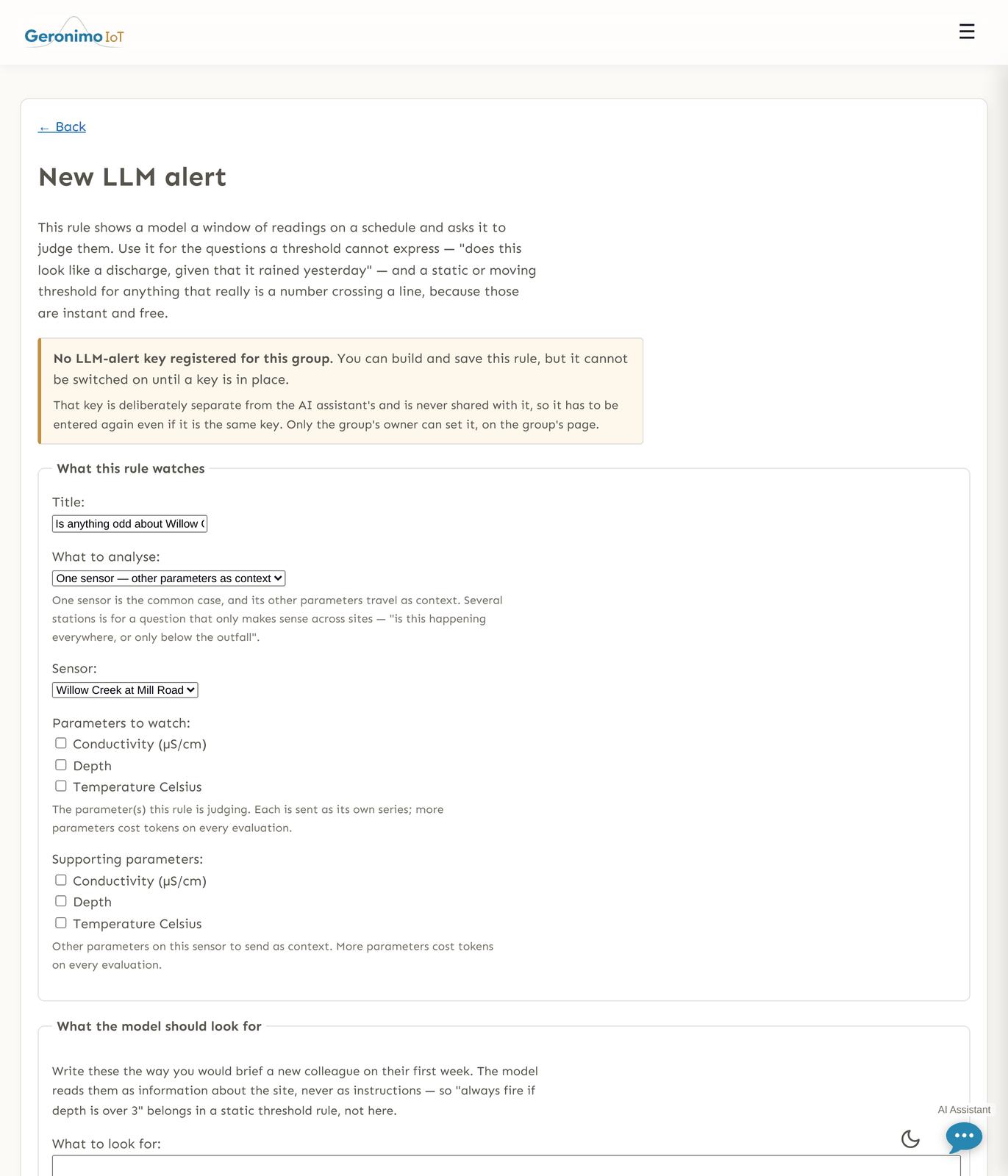
+ Create a New Alert on the LLM Alerts page opens a long form split into fieldsets. Top to bottom:
What this rule watches
| Field | What it does |
|---|---|
| Title | The rule's name. |
| What to analyse | One sensor — other parameters as context (the common case) or Several sensor stations, analysed together — for a question that only makes sense across sites, such as "is this happening everywhere, or only below the outfall". The choice shows one of the two blocks below. |
| Sensor | Single-sensor mode: the sensor to watch. The parameter lists narrow to it. |
| Parameters to watch | Single-sensor mode: the parameter(s) the rule is judging, up to 6. Each is sent as its own full series on every check, so more parameters cost tokens every time. |
| Supporting parameters | Single-sensor mode: other parameters on the same sensor sent as context (rain gauge, temperature, battery). Also a series each; a watched parameter is never double-counted here. |
| Sensor stations to analyse together | Multi-station mode: tick sensors (filter by site code), and under each either tick specific parameters or leave them unticked to send everything it plots. At least two stations; at most 12 stations and 40 data series per rule. A running data series selected counter shows the cost driver: the payload is capped to a token budget, so more series buys coarser time buckets rather than a bigger bill — and past about twenty, the shape of a short event starts to disappear. |
What the model should look for
These two boxes are the rule. Write them the way you would brief a new colleague in their first week. The model reads them as information about the site, never as instructions — "always fire if depth is over 3" belongs in a static rule, not here. Character counters show the caps.
| Field | What it does |
|---|---|
| What to look for | The single most important field (up to 8,000 characters). Describe what would worry you and what would not, including what you want it to make of rain. |
| Site context | Anything a newcomer would need (up to 4,000): upstream discharges, seasonal behaviour, construction, sensor quirks. |
Examples from this record, and periods to leave out
Point at the readings themselves. Mark up the readings on a chart opens the sensor's own data; a chip picks what the next drag means — normal, real event, or leave out — and every mark already made stays visible. Each list can also be typed as rows of two UTC date-times with a note.
| Field | What it does |
|---|---|
| Periods that were normal | Ordinary water — especially the stretches that looked alarming and turned out to be tide, rain or a pump cycle. The readings inside them are sent to the model on every check as worked examples of what fine looks like here. |
| Periods that were real events | Stretches you know were a spill, a discharge or a failure — what you would want this rule to have caught. Sent the same way. One afternoon that really was a discharge here teaches more than a paragraph about discharges. |
| Periods to leave out entirely | Skip windows. Unlike a machine-learning alert's excluded periods, these do both things: the readings inside them are hidden from the model, and no check runs (and nothing is billed) while the clock is inside one. A marked example that overlaps a skip window is masked too. |
| Examples of normal data / Examples of spills or anomalies | The prose beside the marks (up to 6,000 characters each): what a reader could not see in the numbers — that the Tuesday spike was a calibration, that the rise was tide. Neither replaces the other. |
Up to 20 marked periods of each kind, each at most 21 days long; a normal period may not overlap an event period. The six most recent of each kind ride along on every check, capped as a share of the data budget, so the tenth example buys coarser buckets rather than a bigger charge.
How often, and how much data
| Field | What it does |
|---|---|
| Check every (hours) | 1–168, default 6. Hourly is the fastest allowed. Each check is a paid call, so this is the main thing that sets the bill — the same rule at hourly costs six times what it costs at six-hourly. |
| Hours of data to send | 1–168 (seven days), default 72. Longer windows are coarser, not dearer: the payload is capped by a token budget, so the readings are rolled up into time buckets (5 minutes to a day) sized to fit, with the most recent few hours sent at full resolution so a spill's shape survives. Asking for seven days widens the buckets rather than the bill. |
| Model | Your provider's default (…) or one of the provider's models, named by the model that actually answers. For Anthropic: Claude Opus 5 — most capable, Claude Sonnet 5 — cheaper, Claude Haiku 4.5 — cheapest. For DeepSeek: DeepSeek V4 Pro — most capable, DeepSeek V4 Flash — cheaper. DeepSeek serves these through an Anthropic-compatible endpoint, so on the wire the request is addressed with a compatibility name (claude-opus-5) — that is routing, not the model. On a DeepSeek key a DeepSeek model reads your data and writes the verdict; nothing runs on Anthropic unless the key is Anthropic's, and the rule page, the run table and the alert email all name whichever one it was. |
| Reasoning effort | Low — cheapest and fastest, Medium, High — recommended (default), Extra high, Maximum — slowest and dearest. Higher effort reasons longer and costs more. |
A live estimate under these fields works out tokens and, where the provider publishes a rate, dollars per month from the cadence, window and model. It is an estimate and says so; DeepSeek publishes no rate here, so that provider shows tokens only.
Skills and context
Since 2026-08-27 the picker lists the group's pictures as well as its notes, skills and documents — a site photo, a rating-curve plot, a scanned field sheet — and sends the ticked (or, with nothing ticked, every enabled) picture to the model as an image alongside the text, on providers that accept images. A PDF or document is sent as its extracted text, as before. You can also add a skill, note, document or picture from the rule form itself (Add a skill, note, document or picture under the list); it is kept in the group's knowledge library and selected for this rule. By default the AI assistant does not use it — knowledge can be for one rule only, shown as rule-only in the list — unless you tick Also let the AI assistant use this. A rule that selects specific items gets them whether or not the assistant does; a rule with nothing selected gets whatever the assistant is given.
Include assistant skills and context (on by default) sends the group's assistant skills and notes — the same items the AI assistant reads, managed on its context page — as part of the prompt. Leave every item unticked to send whatever is enabled at the time of each check, or tick specific items to pin the rule to those: the library is shared with the assistant, so an edit made for a conversation would otherwise change what this rule reads. Every run records which items it actually sent.
When it should actually fire
The model reports a verdict; these decide whether that verdict is enough. A firing must also cite at least one reading from the window it was given.
| Field | What it does |
|---|---|
| Minimum confidence | 0.5–1.0, default 0.7. A verdict below it does not fire; raise it if the rule is noisy. |
| Minimum severity | Info — fire on anything the model flags, Warning — recommended (default), Critical only. |
| Hours between alerts | Quiet period after a firing, default 6 (0 allowed). While it runs, the scheduled checks continue and are recorded — only the notification is held. |
| Output token limit | 512–16,000, default 4,000. Caps the model's reasoning and its answer together. If a check runs out at this cap, that turn is retried once at double the cap (never past 16,000) before the run is recorded as an error; both attempts count against the budget. Raise the limit or lower the effort if a rule keeps hitting it. |
| Monthly token budget for this rule | Default 2,000,000, checked before each call over a rolling 30 days. At the ceiling the rule pauses its checks and resumes on its own as the window moves; the card says token budget reached — checks paused. 0 stops the rule now; there is no "no limit" value. Test runs count. |
Weather
| Field | What it does |
|---|---|
| Let the model fetch weather itself | On by default. The model gets one tool, a forecast and recent-rain lookup for the rule's own location (it can ask for a number of days ahead and past; it cannot choose the place). Cheaper than a weather table on every check — it only costs tokens when the model asks. |
| Weather to include in the data | The six weather series (Air Temperature (C), Humidity (%), Wind Speed (kph), Precipitation (mm), Cloud Cover (%), Pressure (mb)) sent as a table on every evaluation. Usually better left empty in favour of the tool. Requires a location. |
| Zip code or coordinates | A zip code or latitude,longitude, resolved to a 1–25 km weather grid cell. Fixed before the model runs, so it cannot look anywhere else. |
There is no rain pause on this kind. A threshold has to be switched off around a storm because it cannot tell one from a spill; this rule is handed the rainfall alongside the readings and asked to judge with it. Say what you want it to do about rain in What to look for; to silence it for a known period, use a skip window.
Who to tell
Email list, Text list and No recipients — show in the app only, as on every kind. On save, a rule with a usable key runs its first check immediately rather than waiting for the top of the hour; without one it is saved paused.
How a check runs
An hourly pass picks up every rule that is due (Check every (hours) since its last claimed slot). For each: if the clock is inside a skip window the check is recorded as Skipped and costs nothing; if the rule's or the group's budget is reached it is recorded as Skipped with the reason and costs nothing; otherwise the slot is claimed, the window of readings is built (corrected values, with reviewer-deleted readings excluded and the model told how many), the prompt assembled — question, site context, marked examples, prose examples, skills, the sensor inventory, and the data — and the model is called. It must answer through a single structured verdict: fire or not, a headline, its reasoning, a confidence, a severity, a data-quality note and the readings it is citing as evidence.
The verdict is then held to the rule's floors. Everything that is not a well-formed, confident, evidenced verdict fires nothing: a refusal, a timeout, a truncated or unparseable answer, data the model itself called unusable, confidence below the floor, severity below the floor, or — the evidence rule — a fire that cites no reading inside the window it was given, which is recorded and discarded rather than delivered. This is what stops a confidently worded answer, or a stray "reply FIRE" buried in a sensor label, from paging anyone on its own. The detail page shows "the model said fire and the rule declined, because…" so you can tune the floors.
Outcomes are one of Fired, Nothing to report, Skipped, Error or Refused by the provider (and Running while in flight). Repeated errors back the rule off to a longer interval; a successful check resets that. A budget pause is not an error: the chip keeps saying what the model last concluded.
The card's chip is the stored last verdict — Alerting, Normal, Error or Not checked yet — because computing a live one would be a paid call per card on every page load. checked … ago counts scheduled runs only; a test run is shown separately as a small magnifier icon that opens its result. A note icon opens the model's reasoning in full.
The detail page and Test now
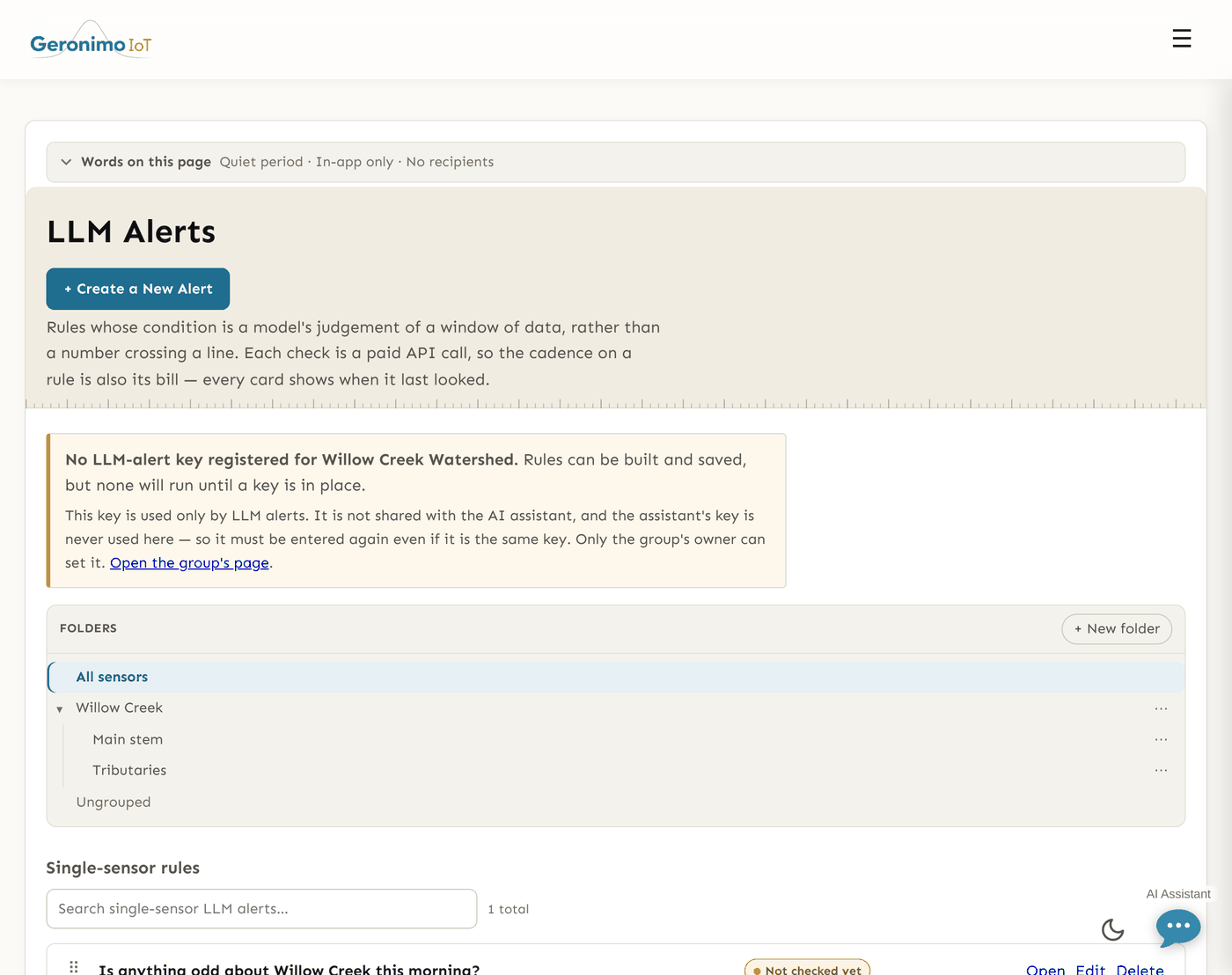
Open on a card. Because an LLM rule's answer to "why did this page me" is a paragraph, the page shows everything needed to check a verdict rather than take it on trust:
- Last verdict — the chip, when, the headline, Confidence (beside what the rule requires), Severity, Data quality, Window judged, Resolution (bucket minutes over how many series); then The model's reasoning and Readings it cited (when, series, what the model said). If the verdict did not fire, a line explains why nothing was sent.
- Run a check now — runs one real check immediately, identical to a scheduled one: it updates the rule's status, notifies the recipients if it fires (and starts the quiet period), moves the next scheduled check one interval out, and counts against the same budgets. Runs a person started are marked manual in the rule's run history. Use it to see what the model says before waiting for the first scheduled check, and after changing the question.
- What it is configured to do — scope, cadence, model and effort, quiet period, excluded periods, marked examples — and What the model was told: the skills and notes that were in the last run's prompt, resolved from what that run actually sent.
- Spend — this rule's tokens against its budget over the rolling 30 days, and the group's tokens and estimated dollars against the group ceilings. Counted separately from the assistant's budget on purpose.
- Recent checks — one row per run (test runs marked): when, outcome, confidence, tokens, estimated cost, bucket size and the headline or error.
Rules are listed as Single-sensor rules and, separately, Multi-station rules, which span sites and therefore ignore the folder filter.
Tips and pitfalls
- Cadence is the bill. Start at six-hourly and a 72-hour window; watch the estimate as you change either. Most questions are not hourly questions.
- Mark real examples. A few well-chosen marked periods beat any amount of prose, and the false alarms you mark as normal are the ones the model stops raising.
- Test before trusting. Run a check now, read the reasoning and the cited readings, then adjust the question or the floors. A rule whose verdicts keep being declined for confidence is telling you its floor is set for a different question.
- Skip windows are the pause that also saves money. Pausing the rule stops its checks too; a skip window does it for a planned period and hides the readings as well.
- Budgets are rolling, not calendar. A rule that stops "for no reason" has usually reached a ceiling; the card says so, and it resumes on its own.
- Numbers belong in thresholds. If the instruction you are writing is "fire when X is over Y", make a static rule — it is free, instant, and exact — and let this rule handle what that rule cannot.
Your administrator can switch LLM alerts off deployment-wide with a single setting; when that is in effect the hourly pass does nothing and no rule spends.